
Cybercrime is on the rise, and criminals are using more advanced tricks to steal money and personal data.
Two of the most common and dangerous methods used today are phishing and vishing.
While both are forms of fraud, they use different tactics to trick their victims.
Both can lead to serious consequences if you’re not careful.
But what is the difference between phishing vs vishing?
In this article, we’ll explain what phishing and vishing are, how they work, and how to spot them.
By understanding the differences and recognising the warning signs, you can protect yourself and your personal information.
What is Phishing?

Phishing is a type of cybercrime where criminals try to trick people into revealing personal, financial, or login information.
It usually involves fake emails, text messages, or social media posts that appear to come from trusted sources, such as banks, delivery companies, or government bodies.
The goal of phishing is to get the victim to click on a link, open an attachment, or enter sensitive details on a fake website.
These sites often look almost identical to the real ones, making it hard to spot the difference.
Once the information is entered, the criminal can use it to access banking accounts, steal identities, or commit fraud.
Phishing is one of the most common forms of online scams, affecting individuals and businesses alike.
Some attacks are broad and sent to thousands of people at once, while others are highly targeted and personalised, known as ‘spear phishing’.
Knowing how phishing works and staying alert to suspicious messages is key to avoiding becoming a victim of this increasingly common threat.
How Does Phishing Work?

Phishing scams follow a structured approach that relies on trickery and emotional manipulation.
Here’s how they typically work:
The Setup
First, the scammer chooses a target.
This could be an individual, a company, or a wider group of people.
They often gather information through social media, data leaks, or simply by guessing email addresses.
The goal is to make the message seem personal or convincing enough to get a response.
The Fake Message
The scammer creates a fake email, text message, or social media post that looks like it’s from a trusted organisation, such as a bank, online retailer, or government office.
It may include a link, an attachment, or a request for sensitive information.
Common messages claim:
- Your account has been suspended
- You’re owed a tax refund
- A parcel couldn’t be delivered
- There’s unusual activity on your account
The Hook
The message uses urgency or fear to get you to act quickly without thinking.
If you click the link, it takes you to a fake website that looks real.
If you download the attachment, it may install malware.
The Theft
Once you enter your details or allow access, the scammer can steal your money, identity, or give them access control to your accounts.
The Cover-Up
After the scam, the site may redirect you to a genuine page, so you don’t realise anything is wrong until it’s too late.
Phishing Examples
Phishing attacks can take many forms, and criminals often adapt their tactics to suit current events or popular services.
Below are some common examples to help you recognise these scams.
Bank Account Alert
You receive an email claiming to be from your bank.
It says there’s suspicious activity on your account and urges you to click a link to verify your details.
The website looks genuine, but it’s a fake page designed to steal your login information.
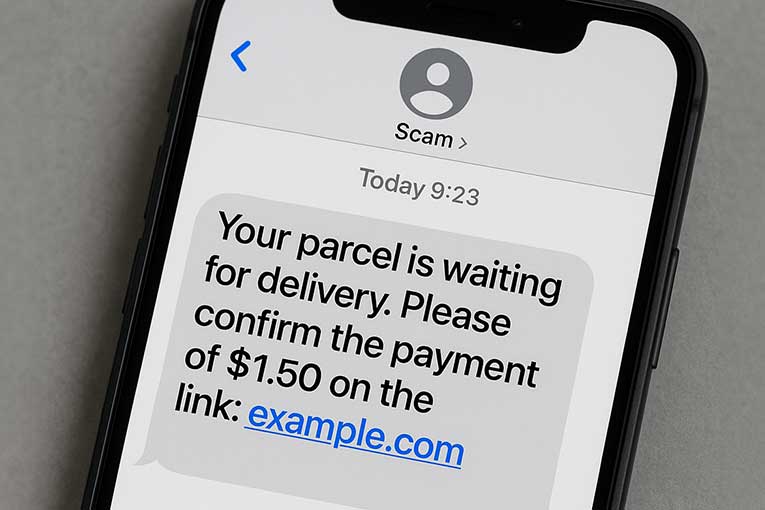
Parcel Delivery Scam
A text message claims that a delivery from a courier (like UPS or DPD) couldn’t be completed.
It asks you to pay a small redelivery fee.
If you enter your card details, the scammers can use them for fraudulent purchases.
Tax Refund Message
An email or text pretending to be from the government says you’re due a tax refund.
To claim it, you must provide your personal and bank details.
This information is then used to commit identity theft or financial fraud.
Fake Invoice or Receipt
You receive an invoice for a product or service you didn’t buy.
The email encourages you to open an attachment or click a link to dispute the charge.
The file may contain malware or ransomware designed to infect your device.
Social Media Warning
A message on Facebook or Instagram says your account is at risk of being closed.
It contains a link to ‘verify’ your identity.
In reality, it leads to a fake login page that captures your credentials.
What is Vishing?

Vishing, short for ‘voice phishing’, is a type of scam where criminals use phone calls to trick people into giving away personal, financial, or security information.
Instead of using emails or text messages like in phishing, vishing relies on voice communication, either through live calls or automated messages.
Scammers often pretend to be from trusted organisations such as banks, the police, internet providers, or government agencies.
They may claim there’s a problem with your account, a security threat, or even a legal issue that needs urgent action.
Their aim is to create panic or confusion, making you more likely to share sensitive information.
Vishing is dangerous because it can feel more personal and convincing than written scams.
The caller may sound professional and knowledgeable, and some even use fake caller IDs to make their number look legitimate.
Knowing the signs of vishing and being cautious on the phone can help you avoid falling victim to this type of fraud.
How Does Vishing Work?

Vishing scams follow a structured process, using voice communication to deceive and manipulate.
Below is a step-by-step breakdown of how vishing typically works.
Caller Setup
The scammer begins by preparing a false identity.
They may claim to be from your bank, the tax office, a utility company, or even your internet provider.
Using caller ID spoofing, they can make their number look like it’s from a trusted source.
Initial Contact
You receive a phone call, either from a real person or a recorded message.
The message is usually urgent or alarming.
Emotional Manipulation
Vishing works by creating pressure.
The caller may use fear, urgency, or even threats to make you act without thinking.
They may warn of frozen accounts, legal action, or loss of service unless you provide immediate confirmation.
Request for Information
Next, the caller asks for sensitive data, such as bank account numbers, passwords, PINs, or personal details.
In more advanced scams, they may guide you to transfer money to a ‘safe account’ they control.
Continued Deception
In some cases, the scammer may follow up with more calls, pretending to offer help or check progress.
This ongoing contact builds trust and makes it harder to realise it’s a scam.
Vishing Examples
Vishing scams can take many forms, often tailored to mimic trusted organisations or familiar situations.
Below are some common examples to help you recognise and avoid them.
Bank Security Call
You receive a call from someone claiming to be from your bank’s fraud team.
They say suspicious activity has been detected on your account.
To ‘protect your money’, they urge you to transfer funds to a ‘safe account’.
In reality, the account belongs to the scammer, and once the money is sent, it’s gone.
Amazon Payment Scam
An automated voice message tells you that your Amazon account has been charged for an expensive item, like a smartphone or tablet.
You are told to press 1 to speak to customer support.
Once connected, the scammer asks for your login or bank details under the pretence of issuing a refund.
Government or Police Threat
A caller claims to be from the government or the police, saying you owe unpaid taxes or are under investigation.
You’re told that unless you pay immediately, you could be arrested or face legal action.
This high-pressure tactic is meant to frighten you into handing over personal or payment information.
Internet Provider Scam
Someone pretending to be from your broadband provider says your network is compromised.
They ask you to install software so they can ‘fix the issue’.
This software gives them remote access to your device, putting your personal data at risk.
Phishing vs Vishing – What’s the Difference
Phishing vs vishing are both forms of social engineering – a way for criminals to manipulate people into giving up sensitive information.
However, they use different methods to do this.
Both methods rely on the victim trusting the message or caller.
However, vishing adds a human element, which can make it feel more believable.
People are often more likely to trust a real voice than a written message.
In many cases, phishing and vishing are used together.
For example, a scammer might send a phishing email and then follow up with a vishing call pretending to help you sort it out.
Let’s look at the key differences:
| Feature | Phishing | Vishing |
| Method | Email, text, or message | Phone calls (live or automated) |
| Medium | Written communication | Voice communication |
| Common Tools | Fake websites, spoofed emails | Fake caller IDs, urgent language |
| Typical Content | Links, attachments, login requests | Account security, fraud alerts |
| Speed | Can be sent to many at once | More targeted and personal |
| Danger Signs | Urgent messages, strange links, typos | Pressure to act fast, unknown numbers |
How to Protect Yourself From Phishing or Vishing
Phishing and vishing scams can be convincing, but with a few simple steps, you can protect yourself from becoming a victim.
Here’s how to stay safe.
Be Cautious with Links and Emails
Never click on links in emails or texts unless you are absolutely sure of the sender.
Always check the email address carefully, scammers often use addresses that look similar to real ones.
Hover over links to see the real destination before clicking.
Never Share Personal Information
Legitimate companies will never ask for passwords, PINs, or full bank details by email or over the phone.
If someone asks you for this kind of information, it’s likely a scam.
Hang up and contact the company directly using a known, trusted number.
Install Security Software
Use antivirus and anti-malware software on your devices and keep them up to date.
Many security programmes also include phishing protection tools that can block fake websites and harmful links.
Use Strong, Unique Passwords
Creating strong passwords and avoiding using the same one for multiple accounts will help your cybersecurity.
Consider using a password manager to keep track of them securely.
Conclusion
You should now have an understanding of the difference between phishing vs vishing.
Phishing and vishing are two of the most common scams used by cybercriminals.
While they use different approaches, both aim to trick you into giving up personal information or money.
Understanding the signs of phishing and vishing is the first step in protecting yourself.
Always double-check messages, avoid clicking unknown links, and never give out sensitive information over the phone unless you are absolutely sure who you are speaking to.
If you suspect a message or call is a scam:
- Don’t respond
- Don’t click any links or give out details
- Report it to your bank or relevant organisation
Staying alert and informed is the best way to defend against these types of scams.
By knowing how phishing and vishing work, you can spot the warning signs and keep your data safe.